
Import & Export Guides
Mini Cold Storage Controller Settings Explained: Setpoint, Differential, Defrost and Alarms
Oct
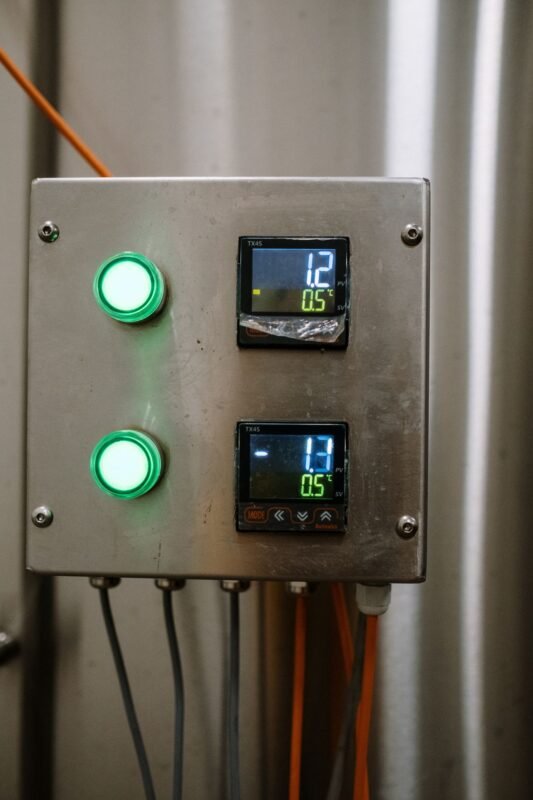
On the door or panel of almost every mini cold storage sits a small digital controller with two numbers on its display and three or four buttons underneath. Most owners only ever touch it to change the temperature. Yet that controller decides when the compressor starts and stops, when the evaporator defrosts, when the fans run, and when (or whether) anyone is warned that something has gone wrong. Wrong settings on it cause more product loss and more compressor failures than many owners realise. This guide explains the main parameters in plain terms, so you can talk to your installer confidently and spot settings that do not make sense.
Controller menus differ between manufacturers, and parameter codes such as r0, dI or AH are not standard. The concepts below, however, are common to nearly every refrigeration controller used in small cold rooms.
What the controller is actually doing
The display usually shows a PV (process value, the temperature measured now) and sometimes an SV (set value, the target). Inside, the controller reads one or more temperature probes and switches relays: one for the compressor or the solenoid valve, one for defrost heaters, one for evaporator fans, and often one for an alarm output. It does not control temperature smoothly; it switches equipment on and off according to rules. Understanding those rules is the key to setting it well.
Setpoint and differential
The setpoint is the temperature at which the controller stops cooling. The differential (also called hysteresis) is how far the temperature must rise above the setpoint before cooling starts again. A narrow differential holds the room temperature tightly but makes the compressor start and stop very often. A wide differential lets the compressor run longer cycles with fewer starts, but the room temperature swings more.
The right balance depends on the product. Produce that suffers from even small swings — for example items prone to chilling injury, discussed in our tomato storage guide — needs a tighter band. Frozen goods tolerate a wider band as long as the upper limit stays safely frozen. Your installer should choose these values for the specific product and room, and you should know what they are.
Many controllers also have setpoint limits — a minimum and maximum that staff are allowed to set. Locking these is one of the simplest ways to stop a well-meaning worker from turning a vegetable store down to freezing on a hot day.
Compressor protection delays
A compressor that is switched off and immediately back on may try to start against high pressure, which strains the motor and can trip protection. Controllers therefore include an anti-short-cycle delay: a minimum time between compressor stops and the next start, and sometimes a minimum run time. There is often also a power-on delay, which stops all compressors starting at the same instant after a load-shedding cut. In Bangladesh, where supply interruptions and generator changeovers are frequent, these delays matter a great deal — see our guide on voltage protection and wiring and on backup power.
If these delays are set to zero, you may never notice anything until the compressor fails early. Ask your installer to show you that they are set.
Defrost parameters
Ice builds up on the evaporator coil, blocking airflow. The controller manages defrost using several linked parameters:
- Defrost interval — how often a defrost starts, usually counted in hours of time or of compressor running.
- Defrost termination temperature — the coil temperature, read by an evaporator probe, at which defrost ends because the ice has melted.
- Maximum defrost duration — a safety limit that ends defrost even if the termination temperature is not reached, for example if the probe has failed.
- Drip time — a pause after defrost so melted water can drain before cooling restarts and refreezes it.
- Fan delay after defrost — keeps the fans off until the coil is cold again, so warm, wet air is not blown over the product.
Getting these wrong shows up in recognisable ways: ice that never fully clears, water dripping onto stock, or room temperature that spikes after every defrost. The types of defrost are explained in our defrost cycles article; the controller is what puts any of them into practice.
Probe placement and calibration offset
A controller is only as honest as its probe. The room probe is usually placed in the return air stream to the evaporator, which reflects the air temperature of the room. That is not the same as the product core temperature, and it is not the same as the coldest or warmest corner. If the probe sits close to the door, it will see warm air every time the door opens and the compressor will over-run. If it sits in the cold discharge air, the room may end up warmer than the display suggests.
Most controllers allow a calibration offset to correct a probe that reads slightly high or low. Check the reading against a reliable reference thermometer placed beside the probe, and correct the offset only after confirming the difference is consistent. Using the offset to “make the display look right” while the room is actually wrong is a dangerous habit. For a room holding valuable or regulated product, a temperature mapping exercise tells you how the probe reading relates to temperatures across the whole space.
Alarms: thresholds, delays and who hears them
Alarm parameters typically include a high temperature limit, a low temperature limit, and an alarm delay so that a brief door opening or a defrost does not trigger a false alarm. Many controllers also have a separate, longer delay after defrost and after power-on. The trap is setting the delays so long, or the limits so wide, that the alarm only sounds once product is already damaged.
Equally important is what the alarm actually does. A buzzer on a controller inside a locked building at night protects nobody. Connect the alarm relay to something a person will notice: a loud external siren, a light at the guard post, or a remote monitoring device that sends a phone alert. Our IoT temperature monitoring guide covers the remote options.
Door switch input and fan stop
Where a door switch is wired to the controller, it can stop the evaporator fans while the door is open, so the fans do not pull warm air into the room, and raise an alarm if the door is left open too long. This is a small, inexpensive feature that pays back quickly in busy rooms. It works best together with physical measures such as strip curtains.
Common mistakes and a simple settings record
- Nobody knows the settings. The installer configured the controller and left. Ask for a printed list of every parameter value and keep it beside the unit.
- Staff can change everything. Use setpoint limits or a parameter lock, if the controller has one.
- One setting for every product. When the stored product changes, the setpoint and differential may need to change too.
- Ignoring the evaporator probe. If it fails, defrost may run only to its maximum time, every time.
- Alarm silenced and forgotten. Investigate every alarm, and record the cause.
A one-page record sheet listing the product stored, every parameter value, the date set, and who set it will save hours of guesswork the next time a technician visits. If you are buying a new room, ask your supplier to pre-configure the controller for your product and supply this sheet with it — it is part of what we arrange for clients sourcing a mini cold storage from China. Settings should also be reviewed during routine maintenance visits.
Every shipment is different, so we do not publish fixed rates or timelines for mini cold storage equipment. Tell us your product, volume and destination and ask us for a quote built around your needs. You can also see our full sourcing, freight and C&F services, use our China sourcing and buying agent service, or browse products we already source.
